
Running Black & White on Windows 10

Hi all, firstly I was so hyped to stumble across this project. I loved B&W 1 as a 9 year old but never had the patience to finish it so I'm excited to give it a go in my 30s. I've installed the base game, 1.1, 1.2 and 1.42 and am launching the game with the runblack.exe file. I have my video settings to 1920x1080. I haven't changed anything further. Unfortunately the game is stuttering for me, the menu where I type my name and select my symbol and the intro video of the child running to the water to be saved too. My pc is Intel i7-8700 @3.2Ghz, 32G ram, Nvidia RTX 2070. My Windows 10 is 64 bit. Oddly, if I run this in windowed mode and click onto my second monitor (without the game running on it) the intro video runs perfect, when I click onto the running B&W game the stuttering occurs. Anyway, I've searched through the discord channels and forum posts for any similar problems but it only makes me jealous of all the smooth running gameplay. Any help would be greatly appreciated. Thanks


Edit: Looks like it's fixed by disabling G-Sync for my Nvidia graphics card.
 
Last edited:

Buongiorno a tutti, ho appena seguito tutti i passaggi per installarlo. Ma non appena parte il gioco si blocca ed esce.. cosa posso fare? grazie e per le vostre risposte
 
@Matt Would it be possible for you to add the Infinite Drawing Distance as Optional 4th step into´your guide?

It's just such a huge QoL that it is almost a must to have for all players imo.
Patching the game

Without the unofficial patch, the game will not launch, so it is crucial you follow the order of steps below exactly.

You should not install patch 1.3, it is a patch purely for the P5 glove.


  1. Download and install Patch v1.1 and Run as Administrator.
  2. Download and install Patch v1.2 and Run as Administrator.
  3. Download and install Unofficial Patch v1.42 and Run as Administrator.
  4. (Optional) Download the Infinite Drawing Distance runblack.exe and replace your runblack.exe with it.
 
Last edited:
@Matt Would it be possible for you to add the Infinite Drawing Distance as Optional 4th step into´your guide?

It's just such a huge QoL that it is almost a must to have for all players imo.

I don't believe it to be stable so I'm not going to recommend it. Even on modern hardware the game is still running on DX8 and rendering more than originally intended at once is going to make crashes much more likely.
 
Ok, i've already reported this to the Discord but i guess i'll do it here also since it's a really nasty bug that causes the game to be gradually unplayable:
Regardless if im using vanilla Black And White and/ or Ultimate and/or other mods, the game keeps crashing everytime my creature is in the process of respawning either from fainting from Tornado or from Damage/Hunger/Tiredness when i reaches 100 % when killed, happens also on new profile/new creature be it in Black And White or Ultimate, as soon it starts to respawn it crashes everytime and yes i followed every process of installation here
 
Some of us do not have the original disks. I have funked with this at one point and it did work. But the combination eludes me since I had to reinstall. Is there an updated version of the install? The new one from a month ago does not work. When I try to load the first patch (as an admin) I keep getting the game not installed properly.
 
There is a modification Black & White: Ultimate. is a large modification based on Black & White: Creature Isle. It includes the original Black & White story, the original Creature Isle story and many other extra features, all in a single mod. This means you can play the original Black & White with all the features from Creature Isle!

Also, there is a modification HD Project which improves textures and 3D models. Install on top of Ultimate.

There is also another modification Genesis Mod, which is install on top of the HD Project.
This modification smoothly develops into a full-fledged Black&White: Definitive Edition
The Genesis mod includes many new islands with a big story in 4 parts (Stormymod part, God-Father part, Atlantis part and Volcano part).
And some of the features you know from Black&White 2, like the multi-pickup and epic wonders, are now available in the first part of Black and White. Also added new objects (chaos diamonds) and new textures for stones and pillars. The game also has an in-game map editor.
1. Ten Epic-Wonders.
2. Tributmode with different Extras, for example Day/Night changer, Multipickup, Extra-Buildings... (Additional buildings can be purchased separately in Tributmode.)
3. A new Story with more than 15 lands, new gods and more...
4. Two new creatures (a Fox and a Dragon) and a new Spell (Spell of Hungry).
5. Much other bonus features like Interface, Extra Stats....
6. In-game map editor (only available in skirmish mode )
7. New objects and textures (textures of water, stones, pillars, sky, horizon, etc.).
8. New music and improved quality of existing music (some music tracks replaced with music from B&W2)
9. Many puzzle challenges (such as fish puzzle, totem puzzle or temple puzzle) have been added to different lands (some also as new story scenarios)
You can discuss the development of the Genesismod or Definitive Edition with the author on Discord
 
Last edited:
There is a modification Black & White: Ultimate. is a large modification based on Black & White: Creature Isle. It includes the original Black & White story, the original Creature Isle story and many other extra features, all in a single mod. This means you can play the original Black & White with all the features from Creature Isle!

Also, there is a modification HD Project which improves textures and 3D models. Install on top of Ultimate.

There is also another modification Genesis Mod, which is install on top of the HD Project.
Carefully!!! The Genesis mod replaces the original Creature Isle, plus all menus and dialogues are in German.
The Genesis mod includes many new islands with a big story in 4 parts (Stormymod part, God-Father part, Atlantis part and Volcano part).
And some of the features you know from Black&White 2, like the multi-pickup and epic wonders, are now available in the first part of Black and White. New objects have also been added, such as Chaos Diamonds, and some objects and other things have received new textures, such as stones. The game also has an in-game map editor.
I forgot to make an edit. I did find a way to install. The only dumb thing is that the ape is basically a roving moron. No matter what I do he always wants to poop everywhere and is always playful. I have deleted/created new profiles all the time just to test some theories. I light punish to basic ape-abuse and no matter what, he still wants to flip me off and go play and shit on everything. But he's too cute to not pick, so I'm trying every permutation I can think of. lol
 
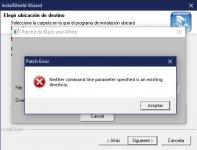
Hello Black_White_Patch_v1.100 show that error in Windows 10 doing exactly what the intallation tutorial says untill step 2.


rg.jpg

EDIT: Im sorry I just figured out I did not install the game to a custom folder. Been looking to play this for twenty years lol.
But now it seems music its not working :/

Edit: I copyed the Music folder from cd to the installation folder.
 
Last edited:
Hi, I'm having the "game instantly closes after the intro" problem. I did everything right except when I ran the 1.42 patch it created a secondary folder called "Black & White", inside the folder I made . I assume the files were supposed to replace the ones I had in my folder so I moved/replaced them, not sure if that caused this problem. Should I just wipe it all and try again or is something else the problem?
 
Hi, has anyone managed to play the game on windows 11? at resolutions higher than 800x600 the screen is not centered.

View attachment 7498
In the Fan Patch set up utility try to choose a different resolution.
Try to check "windowed" and see what works.
I am running the game on a M2 Apple with a native resolution of 2560x1664.
In the setting utility I have a setting of 1710x1112 w/o windowed checked and it is perfect in full screen mode.
 
What is the BaW Patch?
Is it necessary if the Fan patch is already installed?
Thanks
 
Here is a new "runblack.exe" based on the 1.42 patch. (replace the file after installing 1.42)
This one was created by the Discord user "ayleia" from the B&W Discord.


It increases the drawing distance of (almost all) 3D models.
The only thing that still fades out is the land texture.

Still, this change also seems to slightly increase the performance overall on top of the amazing gameplay improvement of not having everything fade out in front of your face.


Apparently Matt is supposed to release an official mod of this on BWFiles soon?
So far no word on it though, so I thought I'd at least share this one made by ayleia, as it is an amazing quality of life improvement!

thank you! thats what im looking for! <3
 
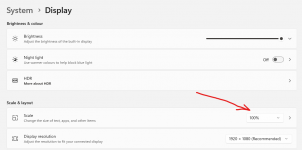
If anyone is having issues with the native screen resolution not fitting the screen properly (e.g. trying to use a 1920x1080 screen resolution when that's your native screen resolution, and half the image not appearing on the screen) - on Windows 10/11 there's a 'scaling' option in Display Settings which seems to impact it.
I haven't looked into a way to change this only on the one game, but I'm sure it's possible - for a quick win, use this:
1696270696735.png
 
Did anyone ever come up with a fix for the game files not saving and if we can recover the save? I was playing for hours and I come to load it back up and it goes straight into the tutorial at the beginning. I’m absolutely devastated!
 
If anyone is having issues with the native screen resolution not fitting the screen properly (e.g. trying to use a 1920x1080 screen resolution when that's your native screen resolution, and half the image not appearing on the screen) - on Windows 10/11 there's a 'scaling' option in Display Settings which seems to impact it.
I haven't looked into a way to change this only on the one game, but I'm sure it's possible - for a quick win, use this:
View attachment 7515
Edit the exe. properties. There is an override for desktop scaling.
 
Did anyone ever come up with a fix for the game files not saving and if we can recover the save? I was playing for hours and I come to load it back up and it goes straight into the tutorial at the beginning. I’m absolutely devastated!
Yeah I found it seems to work if you run the game as admin.
I suspect that means it’s trying to save to a folder it doesn’t have permissions to save to, so there’s probably a better fix if that can be figured out…
 
Did anyone ever come up with a fix for the game files not saving and if we can recover the save? I was playing for hours and I come to load it back up and it goes straight into the tutorial at the beginning. I’m absolutely devastated!
One of the recomendations is not to install into the program files folder. Install it in a folder like GAME, or like it. I installed straight on C: in a folder named Black and white.
 
Back
Top